


Chapter 1, Lesson 11
In Progress
Lesson 11 – How to Interpret Topics Presented in Different Formats or Media
Chapter Progress
0% Complete
Introduction
The web has supported some display of visual material from almost its inception. The current web has strong capabilities to allow the presentation and manipulation of media, and it supports various content formats through several media-related APIs. A web developer’s job might be difficult because a browser’s authors often have complete control over the media formats it supports.
An overview of the media file formats, codecs, and algorithms that may make up media used on the web is given in this guide. Additionally, it offers guidance on prioritizing formats and details on which designs work best with particular kinds of material. It also provides information on browser compatibility for different combinations of these. In this lesson, we’ll discuss several ways to present information and see how they relate.
I. Information and Media
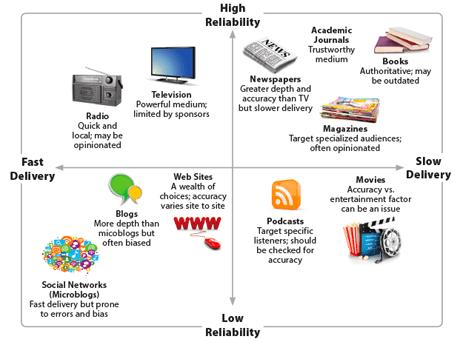
What’s your learning type? Some people are visual learners; others are auditory, kinetic, or reader-writers. We all absorb information in different ways. However, the world needs to know what your learning style is. So, you will be exposed to information in various formats or media throughout your life. When we use this term, media, we’re referring to how people distribute information. Each is important to understand since not all information will be presented in the best way for you.

II. Types of information and media
1. Images
A list of the standard content formats and picture file types used on the Internet. This provides a high-level summary of the advantages, drawbacks, browser support for several image file formats, and best practices for web designers to pick the appropriate format for a given type of content.
2. Media file types and codecs
A list of file formats that may store media information. While some are just appropriate for audio, others may be used for audio and mixed audiovisual content, such as movies. Includes descriptions of each file type accepted by the main web browsers and details on supporting features.
3. Web audio codec guide
A list of the audio codecs supported by the most popular browsers and common media containers. Includes advantages, restrictions, essential details and capabilities, and use scenarios. It also discusses how each browser handles utilizing the codec with specific containers.
4. Web video codec guide
This page gives a general overview of the video codecs supported by the main browsers and others that are less often used but may still come up. Along with codec capabilities, advantages, and constraints, it also discusses browser support levels and limitations.
5. Codecs in common media types
By including the codecs option as part of the typed string, you may add information when declaring the MIME type characterizing a media format. This document defines the format and potential values for the common media kinds for the codecs option.
6. Codecs used by WebRTC
Instead of requiring a container, WebRTC transfers the encoded media directly between peers, using MediaStreamTrack objects to stand in for each audio and video track. The codecs frequently used with WebRTC are discussed in this tutorial.
7. Digital audio concepts
An explanation of the digitalization and storage of audio for use by computers. It discusses the fundamentals of sampling audio and terms like sample rate, audio frames, and audio compression.
8. Digital video concepts
A primer to the basic ideas behind digital video as it is used on the web, including information on chroma subsampling, color formats, how human perception affects video coding, and more.
9. Tutorials and how-tos
This article discusses creating online content that maximizes quality or performance while ensuring the broadest possible compatibility. This is done by selecting media formats carefully and providing fallbacks and alternative formats where appropriate.
10. Media Capabilities API
Using the Media Capabilities API, you may learn about the encoding and decoding capability of the hardware that your website or app is using. This enables you to decide which formats to use and when.

III. How to organize the topics presented
You can ensure that your presentation comes out as confident, intelligent, and attractive—and that your audience learns from it—by carefully organizing it, using specific, time-tested presentation tactics, and rehearsing. Depending on your goal and project, the particular steps required to create a presentation may differ. These are the standard procedures, however.
To make a presentation based on your ideas, follow these steps:
- Decide on your presentation's purpose and essential topics.
- Outline your thoughts.
- Find chances to use audio or video media, and make or find the appropriate media aids.
- Practice your presentation beforehand.
- Make your presentation to the group.
You must create presentation-appropriate information if you want to deliver a good presentation. Your presentation comprises your ideas, but to convey them clearly, you must adequately organize and prioritize them. You can discover and arrange essential concepts by first reading the following considerations.
- Be succinct. The most significant concepts will be included, while others will be omitted. It could be necessary to simplify some ideas.
- Use a variety of expression methods. You should provide other media, such as web pages, graphs, photos, videos, or audio recordings.
Get ready for a presentation in person. Coming across as a serious and knowledgeable speaker is critical if you must present in person. Depending on the situation or audience, you will frequently talk impromptu or in a style that has been practiced but has yet to be remembered. You’ll need to be aware of your points and maintain their interest.
IV. FAQ
1. What is meant by "different formats or media"?
Information is presented in a variety of formats or media, including written articles, videos, podcasts, infographics and presentations, among others.
2. How do I effectively interpret information from written articles?
Pay attention to the headings, subheadings, and article structure when interpreting written content. Determine the introduction’s main point and the important details in each section. Pay close attention to the author’s credibility, citations, and supporting information.
3. What should I keep in mind when watching videos or listening to podcasts?
Make notes on the main ideas, illustrations, and arguments that are presented in any audio or visual media. In videos, pay attention to the emphasis, tone, and visual cues. Take into account the creators’ credentials and history.
4. How can I interpret information from visual formats like infographics or charts?
Take a close look at the title, labels, and legends when dealing with visual data. Identify the main idea or trend being presented. To avoid misunderstandings, take into account the scale, source, and context of the data.
5. What's important when interpreting information from presentations or slides?
Keep your attention on the key ideas highlighted on each slide when interpreting presentations. The spoken words of the presenter frequently add more background information. If something is unclear, ask a question and, if possible, look for supplemental materials.
6. How do I handle conflicting information presented in different formats?
Consider biases, evaluate the reliability of the sources, and search for agreement among reliable sources. Verify claims by cross-referencing data and locating additional sources before drawing conclusions.
7. What steps can I take to avoid misinformation or misinterpretation?
Check the credibility of the source or creator. To substantiate facts and assertions, consult several sources. Be mindful of confirmation bias and assess the data presented critically.
8. What's the role of critical thinking when interpreting information from different formats?
In all formats, critical thinking is essential. Inquire about the intentions of the source, the validity of the evidence, and any possible biases. Analyze the consistency of the arguments and the accuracy of the data.
9. Are there tools or strategies that can help me interpret information better?
Develop active listening and reading skills, get practice summarizing important information, check your facts with reliable sources and think about asking an expert their opinion on complex subjects.
10. How do cultural or contextual differences play a role in interpreting information?
Be conscious of the fact that cultural quirks can affect how information is presented and interpreted. To prevent misunderstandings, take into account the topic’s and the source’s cultural context.
Conclusion
We engage in a form of shorthand when we use these narrative techniques in our communication styles, which promote communication behaviors, signify a shared culture or value system, and denote an expectation of communicative and ideological symmetry. However, these myths also spread preconceived notions about what is excluded in a community and what is valued there.