


Lesson 9 – Solar Eclipse
Introduction
Executive Information System (EIS) is a type of information system that is developed to meet the special demands of executives. Executive Support System (ESS) is another name for it.
EIS is usually regarded as a subset of Decision Support Systems (DSS) since it aids in the information collecting and decision-making processes of top executives in a firm, as well as accomplishing the organization’s strategic goals. This is provided by simple access to both internal and external data.
I. Definitions of Executive Information System

1. According to Meall
“EIS is a resource tool; a system that delivers rapid access to the selected key information executives need for their decision making. User should need no IT or keyboarding skills. Access is more likely to be via icons and a mouse or a touch screen, than a keyboard. Data is presented with the help of color and graphics, in a form which is highly structured and easy to understand”.
2. According to Matthews and Shoe Bridge
“Executive Information System (EIS) is 1 computer-based information delivery and communication system designed to support the needs of top executives”.
II. Key Characteristics of Executive Information Systems (EIS)
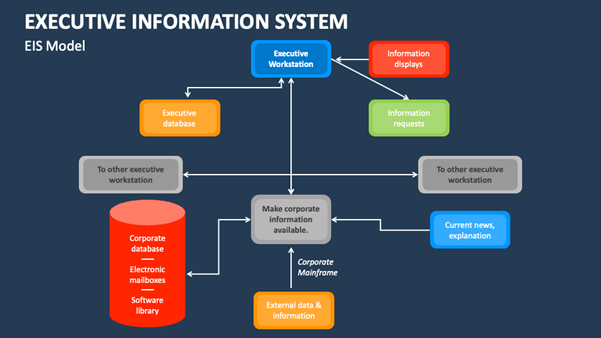
Executive Information Systems (EIS) possess distinct characteristics tailored to meet the specific needs of upper-level management. These characteristics are elucidated below:
Drill-Down Capabilities
EIS facilitates executives in obtaining detailed information, such as identifying a decline in corporate sales within a specific region. In graphical user interface systems, hypertext-style connections are utilized, while menu-driven systems employ sub-menus to access detailed information at different levels.
Designed with Management's Critical Success Factors In Mind
Customization is a hallmark, aligning with the unique critical success factors of each company, whether at the individual, departmental, or organizational level.
Status Access, Trend Analysis, and Exception Reporting
EIS enables executives to access real-time data on key variables. Trend analysis allows executives to study data over time, emphasizing the importance of timing. Exception reporting highlights deviations from established norms, providing insights into the reasons for such deviations.
Personalized Analysis
EIS incorporates built-in functions for examining problematic situations. Executives can specify the required data for analysis and the preferred format for presenting results.
Navigation of Information
Efficient access to vast amounts of data is facilitated within a short timeframe with accurate results. Forward and backward path access, along with the ability to skip screens while accessing specific parts of the system, exemplifies this characteristic.
Presents Graphical, Tabular, and/or Textual Information
Information gathered by EIS is presented to executives in various formats, including textual, tabular, and graphical, enhancing comprehension.
III. Advantages of Executive Information System (EIS)
The significance of Executive Information Systems is underscored by the following advantages:
- EIS is user-friendly, requiring minimal computer knowledge for upper-level executives.
- The system's trends analysis capability aids in strategic decision-making.
- Enhances leadership skills and facilitates better personal thinking and decision-making.
- Offers strategic control flexibility, fostering healthy competition in the marketplace.
- Facilitates easy access to existing information, acting as an instrument of change.
- Expands the executive time horizon, contributing to a more efficient reporting system.
- Provides executives with a comprehensive mental model of business operations.
- Assists in consensus building, communication, and understanding enterprise operations.
- Increases productivity through improved time and team coordination.
- Enhances the capacity and quality of communication.
IV. Drawbacks of Executive Information System
Despite its advantages, EIS comes with limitations:
- Limited functionality for complex calculations.
- Difficulty in quantifying advantages, making implementation justification challenging.
- Potential for information overload for executives.
- Systems may become slow, large, and challenging to manage.
- Maintaining recent data can be challenging, leading to less reliable and insecure data.
- Small-scale organizations may encounter substantial implementation costs.
In addition to the outlined characteristics and advantages, it’s crucial to consider factors such as the need for continuous updates, cybersecurity measures, and training for optimal EIS utilization. Organizations must balance the benefits with the associated challenges.
Conclusion
In conclusion, while EIS significantly contributes to informed decision-making and strategic leadership, a nuanced understanding of its features and potential drawbacks is essential for successful implementation and sustained effectiveness in the ever-evolving business landscape.